The Best Tip Tracker Apps for Servers in 2026, Ranked
Published
Quick answer: On iPhone, we rank Tip'd first, and we make it, so weigh that: every core feature is free, with no ads, no account and no data collected, but it's iPhone-only and new. Just The Tips is second and the best pick on Android, with tip-outs and multiple workplaces in its listing, an ad when you save a shift and an email sign-up. TipKeepr is the best ad-free alternative if you'll pay for Premium, which is where its tip-outs, wages and extra jobs live. ServerLife has the most ratings, but it shows ads, requires an account and puts tip-outs, wages and multiple jobs behind Premium.
Full disclosure first: we make Tip’d, and it's on this list. A ranking written by one of the apps in it deserves a raised eyebrow, so here's how we kept it honest. Every fact about every app comes from its own App Store page, its App Store privacy label, its Google Play page and its developer's website, all checked on October 12, 2026. We didn't buy every app's premium tier, so paid features are as each developer describes them. And we say plainly where other apps beat ours.
We looked at the six dedicated tip trackers with the most App Store ratings that have been updated in the past year, plus Tip’d, and ranked them for a server, bartender or host on an iPhone.
How we ranked them
In order of how much each point counted:
- What you get without paying or watching ads. Tips are uneven enough already. A tracker shouldn't take a cut or interrupt you after a double.
- Whether it captures a real shift: cash and card tips, tip-outs, hours, your hourly wage, and more than one job.
- What it tells you: your real hourly with tips, your best days, how things are trending.
- Privacy: whether you have to create an account, and what the App Store privacy label says the app collects or uses to track you.
- Getting your data in and out: importing old shifts and exporting for taxes.
- Reach and track record: Android, ratings and recent updates.
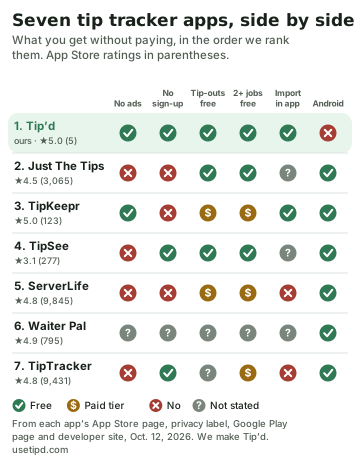
1. Tip’d: the best free tip tracker for iPhone (ours)
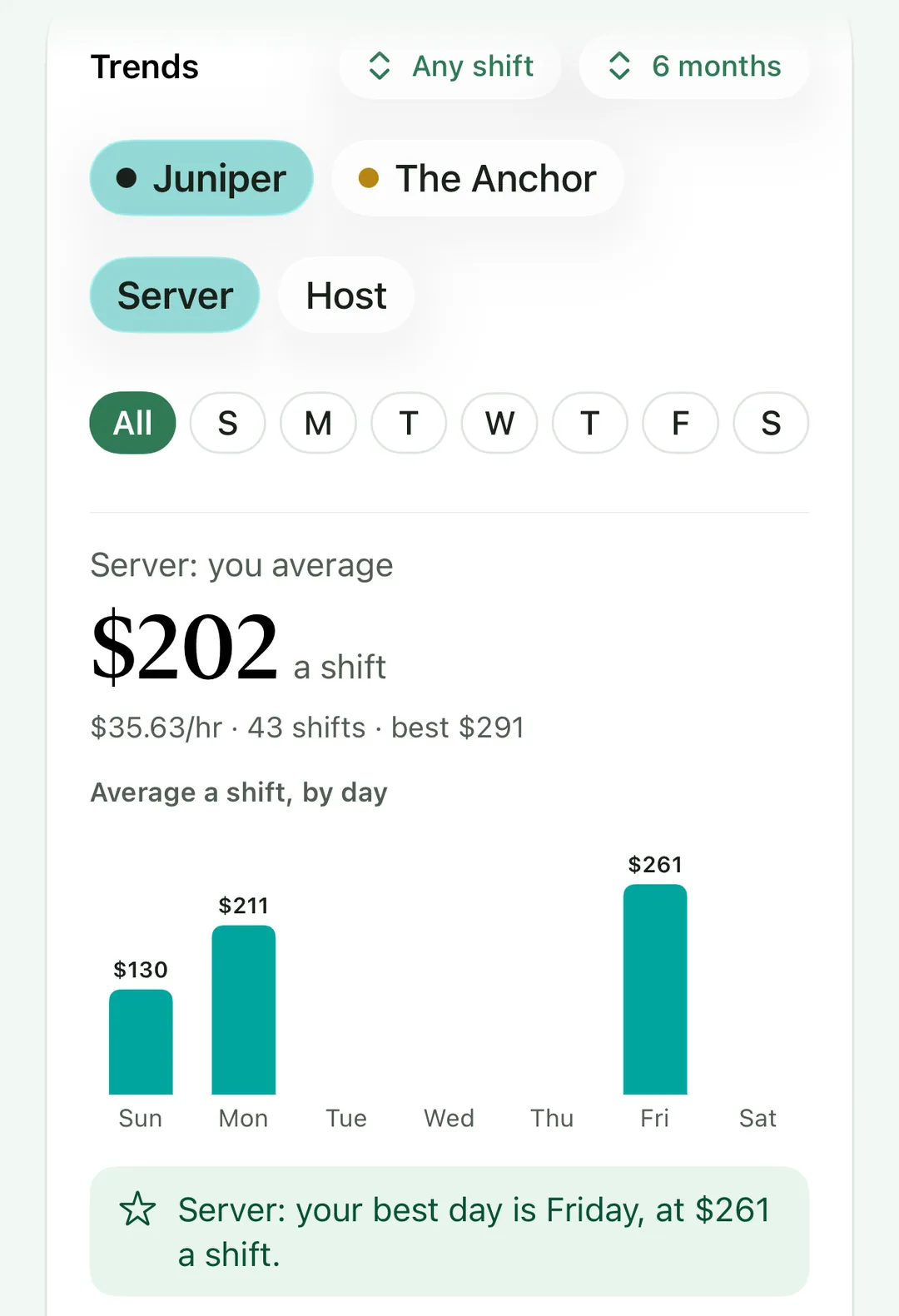
You log a shift's cash tips, card tips, tip-out, hours and position, and Tip’d adds your hourly wage to show what the night was really worth an hour. Each job gets its own positions and pay. Trends show what you average by position, shift type and day of the week, so you can see what a Friday bar shift actually pays. There are goal jars, a paycheck log, and a year summary for taxes as a PDF or spreadsheet. You can import old shifts from a CSV or Excel file, check them before anything is saved, and undo an import. It's in English and Spanish.
- Cost: every feature above is free. The only purchase is an optional monthly Widget Pack for Home Screen widgets.
- Ads and privacy: no ads and no account. Its App Store privacy label says “Data Not Collected,” and your shifts sync through your own iCloud.
- Where others win: it's iPhone-only, with no Android or iPad app, and it's new: 5 ratings so far, against thousands for the oldest apps here.
2. Just The Tips: the best pick for Android, or another language
Just The Tips lists cash and credit tips, tip-outs (a fixed percentage, by sales or manual), hourly pay, multiple workplaces and positions, reports with heat maps, cloud sync and CSV export. It runs on iPhone, iPad and Android, and its App Store page lists 31 languages, Spanish among them. It has 3,065 ratings, averaging 4.5.
- Cost: free with ads; its release notes say an ad shows once a day when you save a shift. Premium unlocks 7 of its 12 reports, and the listing doesn't mark tip-outs or extra workplaces as Premium.
- Privacy: you sign up with an email address. Its privacy label lists identifiers used to track you, and its privacy policy names its ad partners.
- Why second: the most complete free tracking after Tip’d, and the best option if you're not on an iPhone. The ads and the sign-up keep it below first.
3. TipKeepr: the best if you'll pay to skip ads
TipKeepr shows no ads, and it's the most actively updated app here (a new version on October 11, 2026). Its free plan covers cash and card tips, hours, notes, one job, earnings goals, CSV export, and importing a ServerLife CSV. Premium, a subscription or a one-time lifetime purchase, adds multiple jobs, tip-outs and payouts, wages and paychecks, more analytics and a yearly tax PDF. There's no free trial. It has 123 ratings, averaging 5.0, on iPhone and Android.
- Privacy: you sign up and verify your email. Its privacy label lists purchases, identifiers and usage data used to track you.
- Why third: polished and ad-free, but a server with two jobs and a tip-out needs Premium.
4. TipSee: everything free, if you'll watch ads
TipSee calls itself “the only tip tracking app with Free access to all Pro Features”: its advanced features, including hourly wage, multiple jobs and tip-outs, are free with ads, or ad-free with a subscription. There's no login on iPhone, and it can email you an Excel file and backups. Its privacy label lists financial info, contact info, user content and identifiers linked to you, with nothing used to track you.
- Why fourth: generous for free, but its 3.1 average from 277 ratings is the lowest here.
5. ServerLife: the most ratings, but the essentials are Premium
ServerLife is the most-rated dedicated tip tracker on the App Store, with 9,845 ratings averaging 4.8, on iPhone, iPad, Mac and Android. Free, it tracks tips, hours and notes, with totals, reminders and a forecast from your last 90 days. Premium, a subscription with a one-month free trial, adds separate cash and credit tips, tip-outs, hourly wages, multiple jobs and positions, goals and expenses.
- Ads and privacy: its App Store page says it contains advertising, and it sells a separate “remove ads” subscription. An account is required: its help center says it “has always required an account.” Its privacy label lists identifiers used to track you.
- Data: exports come by email, and imports from other apps are done by the developer when you email your file.
- Why fifth: a strong app if you pay for Premium, but the free version leaves out tip-outs and wages, and every version shows ads unless you pay to remove them.
6. Waiter Pal
Waiter Pal lists cash and credit tips, tip-in and tip-outs, your hourly wage, multiple jobs, custom categories, photo memos, CSV export and online backup, with 795 ratings averaging 4.9. It's a free download with Pro subscriptions from weekly to yearly, but the developer doesn't say which features are Pro. Its privacy label lists only data not linked to you, and its Google Play listing says it contains ads.
- Why sixth: a long feature list, but you can't tell what's free before you download, and its last update was December 27, 2025.
7. TipTracker
TipTracker keeps it simple: hourly wage, cash and credit tips, notes, and graphs of when you earn the most. It has 9,431 ratings averaging 4.8, on iPhone and Android, and was updated in September 2026. An extra job, a cloud account, CSV export, custom categories and ad removal are each paid add-ons, and it lists no tip-out field.
- Ads and privacy: its App Store page says it contains advertising, and its privacy label lists location, identifiers, usage data and diagnostics used to track you.
- Why seventh: popular and easy, but it does the least for free and collects the most for ads.
Which one should you pick?
- On an iPhone, and you want everything free, private and ad-free: Tip’d.
- On Android: Just The Tips, or ServerLife if you'll pay for Premium.
- Happy to pay to skip ads, and want a tax PDF: TipKeepr Premium.
- Want a forecast and the biggest community: ServerLife Premium.
Switching is easier than it sounds. Most of these apps export a CSV file, and Tip’d imports CSV and Excel files: you check how it read the file before anything is saved.
Questions people ask
What is the best free tip tracker app?
On iPhone, Tip’d gives you every core feature free with no ads. On Android, Just The Tips has the most complete free tracking, with an ad when you save a shift.
Is there a tip tracker app with no ads?
Tip’d and TipKeepr show no ads. TipKeepr's free plan covers one job and leaves tip-outs and wages to Premium.
Do tip tracker apps make you create an account?
ServerLife, Just The Tips and TipKeepr require one. Tip’d, TipSee and TipTracker don't (TipTracker's cloud account is optional and paid).
Which tip tracker apps work on Android?
All of these except Tip’d, which is iPhone-only.
Can I move my shifts from another tip app?
Usually, if your app exports a CSV or spreadsheet file. Tip’d and TipKeepr import in the app; ServerLife and TipTracker ask you to email them your file.
Isn't this ranking biased?
We make Tip’d, so read it with that in mind. We weighted what we think matters most to people who earn tips (free, no ads, a complete shift, privacy) and took every fact from the apps' own listings, so you can check each one through the links below.
Sources
- Tip’d on the App Store
- Just The Tips on the App Store, its FAQ and privacy policy
- TipKeepr on the App Store, its pricing and free versus Premium
- TipSee on the App Store and its FAQ
- ServerLife on the App Store, and its help center on accounts, hourly wages and importing
- Waiter Pal on the App Store and on Google Play
- TipTracker on the App Store and its update notes