The Restaurant Systems Servers Use: Toast, Square, Scheduling Apps and Tip Payouts
Published
Quick answer: Most restaurants run three systems. The point of sale (POS), such as Toast, Square, Aloha, Clover or SpotOn, is where you ring in orders, close checks, clock in and out and usually declare your cash tips. A scheduling app such as 7shifts, HotSchedules, Homebase or Sling holds your schedule, shift swaps and time off. Payroll pays your wages and card tips, on payday or sooner through cash, a pay card or a tip app. On your checkout, cash due is the cash sales you collected minus the card tips the restaurant owes you; below zero, the restaurant owes you. Card tips must reach you by your regular payday, and only the card company's actual fee may come off. All three systems belong to your employer, so keep your own record too.
First week at a new restaurant: a login for the POS, another for the schedule, a third for payroll, a handheld you've never used, and a checkout slip full of numbers nobody explains. Every restaurant runs on the same few kinds of systems, though, and once you know what each one does, a new job's tech takes a shift to learn instead of a month.
Here's what each system does for you, what the big ones call things, how to read your checkout, how your card tips get to you (and what that can cost), and why your own record matters when all of this belongs to your employer.
The four systems, at a glance
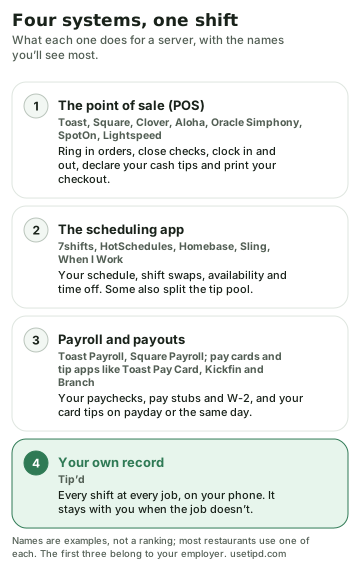
One thing to keep in mind through the rest of this guide: the restaurant sets these systems up, not the software company. Two places on Toast can work differently because the owners switched different features on. When something here doesn't match what you see, your restaurant's setup wins, so ask a manager.
The POS: where your shift happens
The point of sale is the screen at the station and the handheld in your apron. It's where you ring in orders and send them to the kitchen and bar, split and close checks, take payments at the table, clock in and out, and, at the end of the night, run your checkout. The big ones all do the same jobs under different names:
| System | Your checkout | Declaring cash tips | Handheld |
|---|---|---|---|
| Toast | Shift review (also called checkout or closeout) | “Declare cash tips” in shift review, before you clock out | Toast Go 3 |
| Square for Restaurants | Shift report, with “Cash owed to house” and “Cash owed to you” | At clock-out | Square Handheld |
| Aloha (NCR Voyix) | Employee checkout report and clock-out chit, with “Cash owed” | The Enter Declared Cash Tips screen at clock-out | Aloha Cloud handheld |
| Oracle Simphony (MICROS) | Employee Financial Report and Employee Tip Report | Direct and indirect tips at clock-out | Oracle MICROS Tablet 700 |
| SpotOn | Server report, with “Cash due” | “Enter Your Cash Tips” and “Enter Tips Paid To Others” at clock-out | SpotOn Handheld |
| Lightspeed Restaurant | User report | At clock-out; it can't be changed later | Lightspeed Tableside, on an iPhone |
| Clover | Depends on the apps your restaurant adds | A Tips app, often after the shift | Clover Flex |
In most of them, the restaurant decides whether you're asked, and it can make the step required before you clock out. Three things worth knowing about it:
- That number is your tip report. The IRS lets employers take tip reports electronically, so what you type at clock-out is how you meet the monthly reporting rule. Our guide to reporting your cash tips has the $20 rule and the deadlines.
- There's no IRS minimum percentage. Some systems warn you, call for a manager, or won't let you continue when you declare less than a share of your sales the restaurant set. That's the restaurant's setting. The IRS asks you to report what you actually received; the 8% you may hear about comes from the rule for allocated tips at larger restaurants, not a floor for your declaration.
- Tip-outs can live here too. SpotOn can ask for “tips paid to others”, and Toast can record a tip-out as a negative declaration that a manager approves. Either way, you report only what you kept. If your restaurant uses Toast's Tips Manager to split a pool, Toast notes that your checkout slip still shows your tips before the pool; the split shows in the MyToast app's tips receipt.
Your checkout, line by line
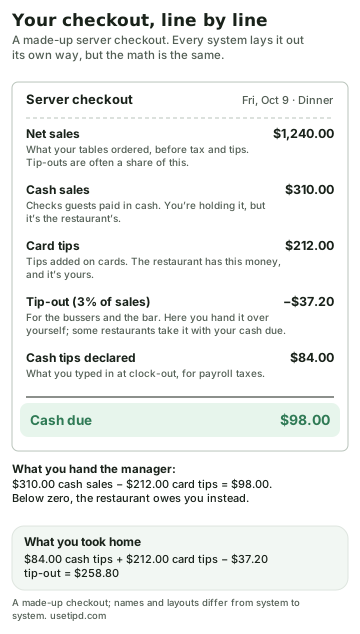
The line that confuses everyone is cash due. During the shift you collect cash for checks, and that money is the restaurant's. Meanwhile the restaurant is holding your card tips. Cash due nets the two: Toast says it works out “what you owe the restaurant or what the restaurant owes you, based on your cash sales and non-cash (credit card) tips.” In Toast's own example, $294.34 in cash sales and $9.00 in card tips means you owe the restaurant $285.34. Square calls the same idea “cash owed to house” and, when your card tips are bigger than your cash, “cash owed to you.”
- Below zero means they owe you. Toast's example the other way: $12.84 in cash sales and $20.00 in card tips, and the restaurant owes you $7.16, paid from the drawer or on your paycheck, depending on the restaurant.
- It only counts cash you're holding. If you carry your own bank, the cash you collect goes into cash due. Cash a bartender or cashier rang into a drawer doesn't, because the restaurant already has it.
- Tip-outs vary. Some restaurants have you pay the bussers and bar yourself; others take the tip-out with your cash due. If yours is a percentage of sales, a table that stiffs you still costs you the tip-out on its check.
- Check before you sign. At many restaurants you and a manager sign the printed checkout. Compare the card tips with your own count first, and snap a picture of the slip; it's the best record you'll get of that night.
Scheduling apps: your shifts, swaps and time off
The schedule usually lives in its own app, which may also clock you in, show your estimated earnings or split the tip pool. Swaps and pickups generally need a manager's approval before they're final.
- 7shifts is free for staff whose restaurant subscribes: see shifts, hours and estimated earnings, trade shifts, request time off and set your availability. Clocking in from your phone uses its 7punches app, if your restaurant turns it on.
- HotSchedules, now part of Fourth, lets you pick up, release and swap shifts, request days off and change your availability. Its App Store app costs $2.99 and needs an account through your employer.
- Homebase has a free app for clocking in, shift trades and availability, and with its Tip Manager your tips show in the app.
- Sling, owned by Toast since 2022, lets you find your own replacement for a shift and mark when you're unavailable.
- When I Work covers clocking in, shift trades and time off, and it can ask you to enter your tips when you clock out.
How your card tips reach you
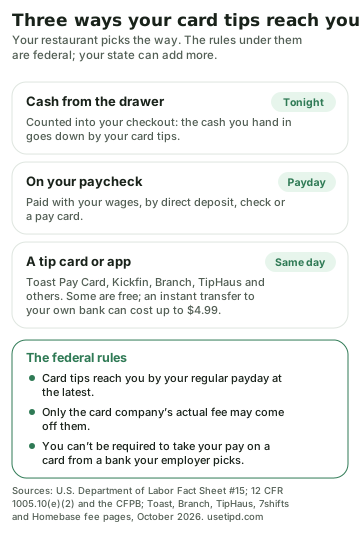
Your restaurant chooses how card tips are paid. Toast's own help center puts the choice plainly: as “a cash payout at the end of their shift or on their paycheck,” or through “a Toast Pay Card or a cash distribution app.” The same-day options, and what they cost you:
- Toast Pay Card and PayOut. End-of-shift tips land on the card, and Toast says there's no cost to take a PayOut. Moving money to your bank is free twice a month, and tip PayOuts are capped at $500 a day. Your restaurant may hold back part of a PayOut for estimated taxes, which is why it can come up short of your tips. It needs Toast Payroll and isn't offered in every state.
- Kickfin sends tips straight to your own bank's debit card, in seconds; its site names no fee for employees.
- Branch pays tips into a Branch account free, or to your own debit card for $2.99 to $4.99 an instant transfer.
- TipHaus charges up to $1.25 a payout to your own debit card, unless your restaurant covers it, and nothing into its own Hausmoney account.
- Early-pay features in scheduling apps work differently: 7shifts' Clair sends part of your tips early, and Homebase's Cash Out part of your pay. Clair is an advance, taken back from your bank account on payday. In both, a standard transfer is free and an instant one costs $4.99.
The federal rules under all of them:
- By payday at the latest. Card tips must be paid “no later than the regular pay day” and can't be held while the restaurant waits for the card company.
- Only the real card fee. The restaurant may take out the percentage the card company actually charges, and nothing more. More on that in can your employer take your tips?
- You can say no to a payroll card. Under federal rules your employer can't make you take your wages on a card from a bank it picks; it has to offer another way, like direct deposit to your own account. The card's sign-up papers must say: “You do not have to accept this payroll card.” Your state decides which other ways must be offered.
- Fast tips are still taxed tips. To the IRS, a tip paid through a payment app is a cash tip like any other, so same-night payouts still count in what you report.
Why keep your own record
Every system above belongs to your employer. Federal law makes the restaurant keep pay records, but it gives you no federal right to copies, and it doesn't even require pay stubs; state laws vary. The employee apps show some history: MyToast lists the tips you declared each shift, and the Square Team app shows your timecards and estimated pay. But their help pages don't describe a way to export your own shift and tip history as a file, and your access can end when the job does.
The Department of Labor's own advice is to keep your own records; its complaint page says personal records of your hours help, and its free WorkWise Timesheet app tracks hours. With two jobs, it matters even more: two POS systems, two schedules and two payrolls, and nothing that adds them up.
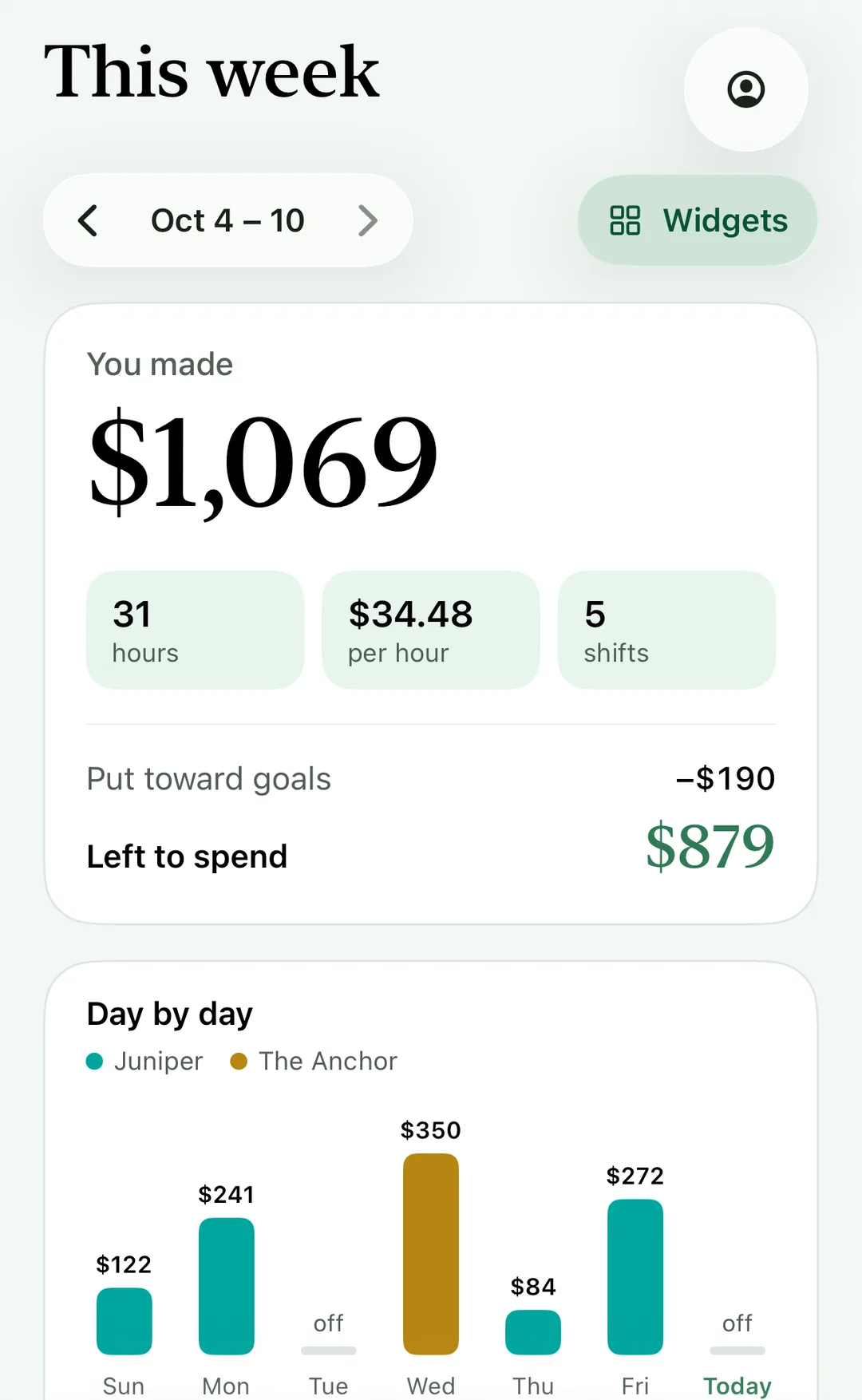
That's what Tip’d is for. It's a tip tracker for iPhone: after each shift you log your hours, cash tips, card tips and what you tipped out, in a few taps, and it keeps every job side by side. Whatever POS each restaurant runs, your week, your month and your real hourly pay are in one place, and they stay with you when you change jobs. If a manager can send you an export of your shifts as a spreadsheet, Tip’d can import it (on the Week screen, tap the profile button, then Import shifts under Your data). Logging shifts is free, and your shifts stay in your own iCloud.
Questions people ask
What is a POS in a restaurant?
The point-of-sale system: the screens and handhelds where staff ring in orders, take payments, clock in and out and run end-of-shift reports. Toast, Square, Aloha, Clover, Oracle Simphony, SpotOn and Lightspeed are common ones.
What does cash due mean on a server checkout?
The cash you owe the restaurant at the end of your shift: the cash sales you collected, minus the card tips the restaurant owes you. If it's below zero, the restaurant owes you.
How do I declare cash tips?
Usually at clock-out, on the POS: Toast asks in shift review, Aloha shows a declared cash tips screen, Square and SpotOn prompt as you clock out. Enter the cash tips you kept after tip-outs.
Do I have to declare 8% of my sales?
No. You report the tips you actually received. A minimum percentage may be your restaurant's setting; the 8% in tax law is about allocated tips at larger restaurants.
Can my employer make me use a pay card?
Not for your wages. Federal rules require your employer to offer another way to be paid, such as direct deposit to an account you choose. State law decides what else must be offered.
Do tip payout apps charge fees?
Some do. Toast PayOut and Kickfin name no fee for employees; Branch charges $2.99 to $4.99 for an instant transfer to your own card, TipHaus up to $1.25 a payout, and Clair and Homebase $4.99 for instant early pay.
Can I get my shift history from my old job's POS?
There's no federal right to copies, state laws vary, and the employee apps don't describe an export. Ask your old manager, and keep your own record from now on.
Sources
- Toast: Shift review overview and Declaring cash tips
- Toast: Completing a shift review (the cash due examples)
- Toast: How Toast handles and distributes tips and Toast Pay Card and PayOut
- Toast: Tips Manager and the MyToast app
- Square: Run a shift report and tip pooling and declaring cash tips
- NCR Voyix: Aloha checkout and tip declaration at clock-out
- Oracle: Simphony shift reports
- SpotOn: Clock out and cash due
- Lightspeed Restaurant: Handling tips and gratuities
- Clover: Add tips to a transaction
- 7shifts, HotSchedules, Homebase, Sling and When I Work
- 7shifts: Clair on-demand tips and Homebase: Cash Out
- Kickfin for employees, Branch fee schedule and TipHaus HausDirect
- U.S. Department of Labor: Fact Sheet #15, Tipped Employees Under the FLSA
- CFPB: If my employer offers me a payroll card, do I have to accept it? and 12 CFR 1005.10(e)(2)
- IRS: Tip recordkeeping and reporting and Publication 531
- U.S. Department of Labor: Pay stubs under the FLSA and the WorkWise Timesheet app