
Tip’d vs. Just The Tips: An Honest Comparison
Published
Quick answer: On iPhone, both apps track cash and card tips, tip-outs, wages, sales and more than one job for free. Tip’d also gives you every report, goals and paychecks for free, with no ads, no account and no data collected; Just The Tips shows an ad when you save a shift, needs an email sign-up and keeps some of its reports for Premium. Just The Tips is the better pick on Android or iPad, in a language Tip’d doesn't offer, or if you want start and end times, covers and section reports. We make Tip’d, so weigh that; every fact here comes from each app's own pages.
Tip’d is the free iPhone tip tracker we make: every core feature free, with no ads and no account.
Full disclosure: we make Tip’d. Just The Tips has been on the App Store since 2015 and is one of the most-rated dedicated tip trackers there, with 3,096 ratings. We'll make our case, but every fact below comes from each app's own App Store page, privacy label and update notes, plus Just The Tips' Google Play page, FAQ and privacy policy, all checked on October 29, 2026, so you can check them yourself. We didn't buy Just The Tips Premium, so its paid features are as Just The Tips describes them. And where Just The Tips is better, we say so.
Tip’d vs. Just The Tips at a glance
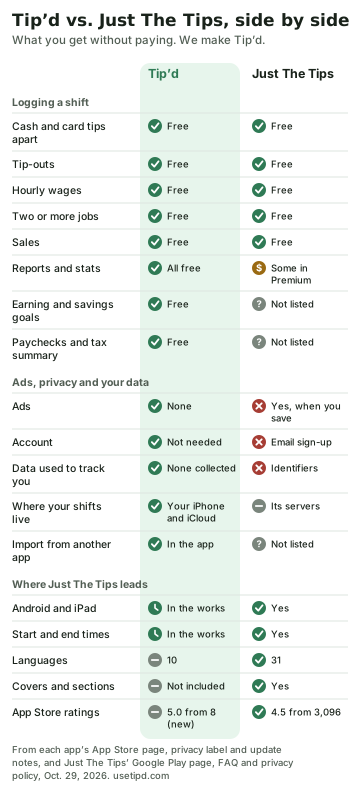
Where Tip’d comes out ahead
No ads, and no account
Just The Tips shows ads. Its update notes say it added an ad on the shift page in October 2024, added an option to remove ads that November, and in December cut the ad back to once a day, when you save a shift. Its Google Play page says it contains ads. It also needs an account: “Just sign up with your email,” its App Store page says, and its FAQ says a valid email address is all it asks for.
Tip’d has no ads and no sign-up. You open it and log a shift. The only purchase is the optional Widget Pack, for Home Screen and Lock Screen widgets.
Every report is free
Both apps cover the core of a shift for free: cash and card tips, tip-outs, hourly pay, sales, and more than one job and position. The difference is what you see afterwards. When Just The Tips rebuilt its reports as 12 modules in October 2025, its update notes said 7 of them were reserved for Premium, the only purchase named on its App Store page; it has added a day-versus-night module since. In Tip’d the week and month views, stats by job, position and day, and trends are all free.
Goals, paychecks and tax time
Tip’d also has earning targets for the week, month and year that fill as you log shifts, savings goals you fill by hand, paychecks with a stub photo it can read on your phone, and a year summary for tax time. Just The Tips' App Store and Google Play pages don't list goals, paychecks or a tax summary. Its privacy policy, updated October 28, 2026, does describe tax features, W-2 figures and photos of checkout slips, so some of that may be on the way.
Your numbers stay with you
Tip’d saves your shifts on your iPhone and, if you use iCloud, in the private part of your own iCloud account. Its App Store privacy label says “Data Not Collected.”
Just The Tips keeps your shifts on its own servers in the United States, which is how it backs them up and moves them between phones. Its privacy label lists identifiers that may be used to track you across other companies' apps and websites, and identifiers used for third-party advertising. Its privacy policy names its ad networks, among them Google AdMob, AppLovin and Meta, and says they may collect device identifiers and IP addresses to show personalized ads. On iPhone, its ad ID is shared only if you allow tracking.
Switching is easier
Tip’d imports in the app: Excel, CSV and text files, photos, screenshots, PDFs and pasted notes, read on your phone, with one summary to check before anything is saved. It recognizes Just The Tips' CSV export. It exports a spreadsheet or a year-summary PDF whenever you want one.
Just The Tips exports your shifts to a CSV file, but neither its App Store nor its Google Play page mentions importing from another app.
Made for iPhone
Tip’d works with Siri (“Log a shift in Tip’d”), has Home Screen and Lock Screen widgets, has layouts made for iPhone Duo, and lists VoiceOver, Voice Control and larger text on its App Store page. Just The Tips' App Store page doesn't list any accessibility features yet.
Where Just The Tips comes out ahead
- Android and iPad. Just The Tips runs on iPhone, iPad and Android, and because your shifts live on its servers, you can switch phones, even from iPhone to Android, and keep your history. Tip’d is iPhone only for now (both apps also run on Macs with Apple silicon), and it syncs between your Apple devices through your own iCloud. Android and iPad versions of Tip’d are in the works; until they're out, Just The Tips is the better choice on those devices.
- More languages. Its App Store page lists 31 languages, and its April 2026 update says the app is fully translated into Spanish, French, German, Portuguese, Chinese (Simplified), Italian and Vietnamese. Tip’d is in ten, including Spanish, Vietnamese, Chinese and Arabic, plus Filipino and Hindi, which Just The Tips doesn't list.
- Start and end times. Just The Tips works out your hours from when you started and finished, and suggests times from your recent shifts. In Tip’d you enter the hours for now; start and end times are in the works.
- Tip-outs worked out for you. Just The Tips can figure a tip-out as a fixed percentage or from your sales. In Tip’d you enter the amount you tipped out.
- Covers, sections and more reports. It tracks covers and the section you worked, with heat maps of how each section did, a day-versus-night comparison, your top three shifts and a shift search. Some of those reports are in Premium. Tip’d leaves covers and sections out to keep logging a shift short.
- Beyond restaurants. Just The Tips is built for stylists, valets, casino dealers, drivers and other tipped jobs too. Tip’d is made for restaurant work.
- A long track record. Just The Tips has been on the App Store since April 2015, with a 4.5 average from 3,096 ratings, and has a 4.8 from 158 reviews on Google Play. Tip’d came out in October 2026, with a 5.0 from 8 ratings so far.
The full comparison
| Feature | Tip’d | Just The Tips |
|---|---|---|
| Price | Free; optional Widget Pack | Free with ads; Premium, and an option to remove ads |
| Cash and card tips apart | Free | Free |
| Tip-outs | Free (you enter the amount) | Free (a fixed percentage, from sales or by hand) |
| Hourly wages | Free | Free |
| Two or more jobs and positions | Free | Free |
| Sales | Free, with tip percentage | Free; tip percentage in its sales report |
| Reports and stats | All free | Some free; some in Premium |
| Earning targets and savings goals | Free | Not listed |
| Paychecks and a year summary for taxes | Free | Not listed |
| Ads | None | Yes; once a day when you save a shift, per its December 2024 notes |
| Account | Not needed | Email sign-up |
| Where your data lives | Your iPhone and your own iCloud | Just The Tips' servers in the US |
| App Store privacy label | Data Not Collected | Identifiers used to track you; data used for advertising and analytics |
| Import from another app | In the app | Not listed |
| Export | Spreadsheet or PDF, in the app | CSV file |
| Languages | 10 | 31 |
| Start and end times | In the works (hours for now) | Yes |
| Covers and sections | Not included | Yes |
| Devices | iPhone (and Apple silicon Macs); Android and iPad in the works | iPhone, iPad and Android (and Apple silicon Macs) |
| Latest version | October 21, 2026 | July 13, 2026 |
| On the App Store since | October 2026 | April 2015 |
| App Store rating | 5.0 from 8 ratings | 4.5 from 3,096 ratings |
Which one should you use?
- You're on iPhone and want every report, goals and paychecks without paying: Tip’d.
- You don't want ads, an account or tracking: Tip’d.
- You're on Android, want your tips on an iPad too, or want the app in a language Tip’d doesn't have: Just The Tips.
- You want start and end times, covers, section reports or tip-outs worked out by percentage: Just The Tips.
Already have years of shifts in Just The Tips? You don't have to choose blind. Download a fresh copy of your data from Just The Tips as a CSV file, then open that file in Tip’d's import. Tip’d recognizes Just The Tips' export and reads the dates, jobs, positions, hours, cash and card tips, tip-outs and wages on your phone, asks about anything unclear, and shows you what it found before saving. Anything else stays in Just The Tips, and your Just The Tips account stays as it was, so you can try both side by side.
Questions people ask
Is Just The Tips free?
Mostly. Logging shifts, with cash and card tips, tip-outs, wages, sales and more than one job, is free, with an ad when you save a shift, which its notes say shows once a day. Premium, the only purchase named on its App Store page, unlocks more reports: when it rebuilt them as 12 modules in October 2025, 7 were for Premium. It also offers a way to remove ads.
Does Just The Tips need an account?
Yes. You sign up with an email address, which its FAQ says is all it asks for, and your shifts are kept on its servers.
Can I move my Just The Tips history to Tip’d?
Your shifts, yes. Download a fresh copy of your data from Just The Tips as a CSV file and open it in Tip’d's import. Tip’d recognizes that file: it reads the dates, jobs, positions, hours, cash and card tips, tip-outs and wages on your phone and shows you what it found before anything is saved.
Is Tip’d on Android?
Not yet, but Android and iPad versions are in the works. For now Tip’d is iPhone only, and also runs on Macs with Apple silicon.
Which is better for servers, Tip’d or Just The Tips?
On iPhone we'd pick Tip’d, and we make it: the whole shift, every report, goals and paychecks are free, with no ads or account. On Android or iPad, or if you want covers, sections and start and end times, Just The Tips is the better fit.
Sources
- Just The Tips on the App Store (its description, in-app purchases, version history and privacy label) and on Google Play
- Just The Tips' home page, FAQ and privacy policy
- Tip’d on the App Store and Tip’d's privacy policy
- Tip’d vs. ServerLife: An Honest Comparison and The Best Tip Tracker Apps for Servers in 2026, Ranked