
Tip’d 1.3 Is Here: Earning Targets, Ten Languages and Even More Privacy
Published · Updated
Quick answer: Tip’d 1.3, out now as a free update, adds earning targets (rings that fill as you reach your week, month or year target), Lock Screen rings for Widget Pack members, the app in ten languages, new layouts for iPhone Duo, a new app icon look for dark and tinted Home Screens, and two new privacy protections: the app switcher no longer shows your earnings, and Tip’d deletes its own copy of an export as soon as the share sheet closes. Like everything else in Tip’d, it's free, with no ads and no account, and your data stays on your iPhone and in your own iCloud.
Tip’d is our free iPhone tip tracker; 1.3 is a free update for everyone who has it.
Tip’d 1.3 is out now on the App Store, a free update. Here's what's in it, starting with the biggest one: a way to see whether this week, this month or this year is on track.
And because it's an update to a tip tracker, it's worth saying up front: nothing in 1.3 sends your money anywhere. It stays on your phone and in your own iCloud.
Earning targets: watch a ring fill
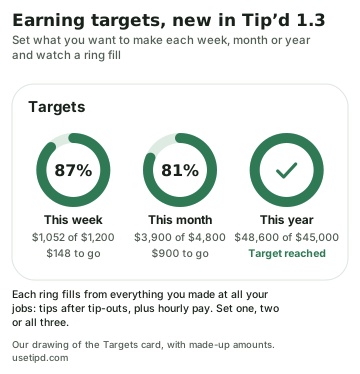
Set what you want to make this week, this month or this year, and a ring for each fills as you work. Each ring counts everything you made at all your jobs, tips after tip-outs plus hourly pay, the same total as “You made” everywhere else in the app. The percent sits inside the ring, a check replaces it when you get there, and the words beside it say how much is left.
- One, two or all three. Add a target with the + on the Targets card, above your goal jars. Tap a ring to change its target or remove it.
- No guessing. The ring shows what you've made, never a projection of what you might make.
- On your Lock Screen. Tip’d Widget Pack gains a sixth widget, Lock Screen rings, in a round, a box or a single line, so you can check the week without opening the app. The box shows the dollars you've made right on your Lock Screen; the round one shows only a percent, if you'd rather keep the amount to yourself.
Your tips stay yours, even more than before
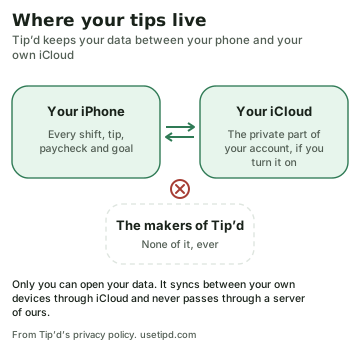
What you make is your business. Tip’d has been built that way from the first version, and 1.3 keeps all of it:
- No account. No email, no password, no profile with your name on it.
- It never reaches us. Your shifts, tips, paychecks and goals are saved on your iPhone and, if you use iCloud, in the private part of your own iCloud account. Only you can open them, and they never pass through a server of ours.
- Nothing watching. No ads, no analytics, no crash reports, no tracking, no location access, and no third-party code collecting anything. We don't sell or share your information with anyone.
And 1.3 closes two small gaps:
- The app switcher hides your money. When you leave Tip’d, iPhone keeps a picture of the screen for the app switcher, and until now that picture could show your week's earnings to anyone holding your unlocked phone. In 1.3 a plain cover with the Tip’d logo goes over the screen first, and comes off when you come back.
- Exports don't linger. When you export a spreadsheet or a year summary, Tip’d deletes its own copy of the file as soon as the share sheet closes. The file goes only where you sent it.
The privacy policy spells out the rest.
Ten languages
Tip’d already speaks English and Spanish. In 1.3 it adds eight more of the languages spoken most in American homes, by Census counts: Chinese (Simplified), Filipino, Vietnamese, Arabic, French, Korean, Portuguese (Brazil) and Hindi. The app follows your iPhone's language for Tip’d, the widgets and Siri's phrases come along (telling Siri a shift's amounts still works in English and Spanish), and Arabic reads right to left, arrows, swipes and all.
Smaller things you'll notice
- Made for iPhone Duo. Open it wide and your shifts, calendar, stats, goals and forms spread across both halves, with the rings above your goals and your profile a tap away from every tab. Fold it closed for the familiar iPhone layout.
- Better imports. Tip’d reads spreadsheets and notes more reliably, with new tools to fix a row before it's saved.
- A new icon look. The app icon gets its own dark version, the wordmark on deep green, plus clear and tinted versions for those Home Screen styles.
- Calmer motion. The goal jars now fill once each time you open the app, not every time you switch tabs, and the new rings and the week's bars do the same.
- Easier to read. Cards get a soft shadow in light mode, Settings shows clearly which shifts are on, and the shift chips switch with a plain tap.
- A round of fixes from a review against Apple's design guidelines and a mobile security standard, plus bugs we found testing on our own phones.
Still free, and the best free tip tracker we know
Everything above is free except the Lock Screen rings, which come with the optional Widget Pack subscription for Home Screen and Lock Screen widgets. Logging shifts, cash and card tips, tip-outs, hourly pay, two or more jobs, stats, trends, goals, targets, paychecks, imports and exports cost nothing, with no ads and no account. The main app will always be free.
We make Tip’d, so take this with that in mind: we compared it with the six most-rated tip trackers on the App Store, and it's the one we'd pick if we didn't make it. Every one of them shows ads, asks you to sign up, or charges for tip-outs or a second job. Tip’d does none of that. Our ranking of the best tip tracker apps lays out how each one compares, including where others do things Tip’d doesn't, like Android.
Questions people ask
When did Tip’d 1.3 come out?
On October 21, 2026, as a free update on the App Store.
Is the 1.3 update free?
Yes. It's a free update, and everything in it is free except the Lock Screen rings, part of the optional Widget Pack.
Can Tip’d see my tips?
No. Your data stays on your iPhone and in your own iCloud. There's no account, and nothing is sent to us.
What's the best free tip tracker app?
We think it's Tip’d for iPhone: free, no ads, no account, with tip-outs, multiple jobs and stats included. Our tip tracker ranking compares it with the others honestly.