
Tip’d vs. Waiter Pal: An Honest Comparison
Published
Quick answer: Both apps are free to download on iPhone. Tip’d gives you every job, position and tip-out, goals, paychecks, export and an iCloud backup for free, with no ads, no account and no data collected. Waiter Pal sells Waiter Pal PRO, a subscription, and its pages don't say what PRO includes; Google Play says it contains ads, and App Store reviewers in 2025 and 2026 say keeping a second job or role separate now needs PRO. Waiter Pal is the better pick on iPad or Android, or if you want clock-in and clock-out times, sections, custom categories, photo memos or an app lock today. We make Tip’d, so weigh that; every fact here comes from each app's own pages and its users' reviews.
Tip’d is the free iPhone tip tracker we make: every job, position and tip-out is free, with no ads and no account, and your shifts can back up to your own iCloud.
Full disclosure: we make Tip’d. This guide is about Waiter Pal: Tip Tracker, which has been on the App Store since August 2022 and has 797 U.S. ratings averaging 4.9. We'll make our case, but every fact below comes from each app's own App Store page, in-app purchases, version history and privacy label, plus Waiter Pal's Google Play page, its privacy policy and its users' reviews, all checked on November 4, 2026, so you can check them yourself. We didn't buy Waiter Pal PRO or test the app for this guide, so its features are as its developer and its reviewers describe them. And where Waiter Pal is better, we say so.
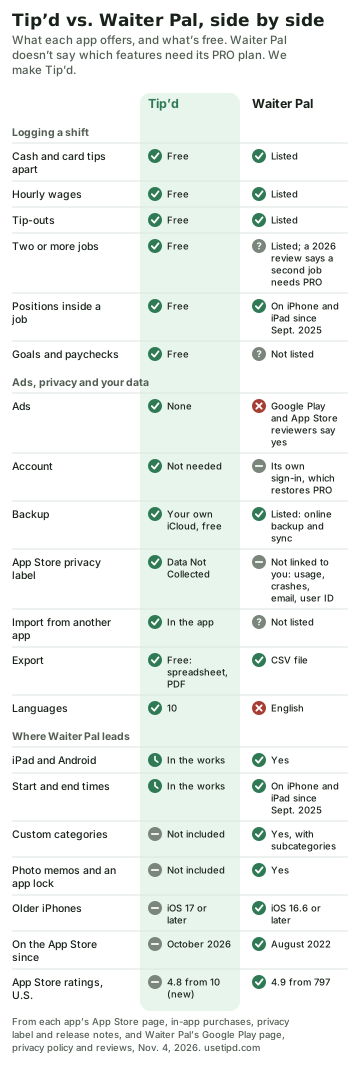
Tip’d vs. Waiter Pal at a glance
| Feature | Tip’d | Waiter Pal |
|---|---|---|
| Price | Free; optional Widget Pack, a monthly subscription | Free; Waiter Pal PRO, a weekly, monthly, six-month or yearly subscription |
| Ads | None | Google Play says it contains ads; App Store reviewers describe them |
| Account | Not needed | Its own account, which restores PRO; its pages don't say if you need one |
| Two or more jobs | Free | Listed; a 2026 App Store review says a second job now needs PRO |
| Positions inside a job | Free | On iPhone and iPad since September 2025 |
| Tip-outs | Free (you enter the amount) | Listed (you enter the amount) |
| Backup and sync | Your own iCloud, free | Online backup and sync |
| Where your data lives | Your iPhone and your own iCloud | Your phone, and online with its sync |
| App Store privacy label | Data Not Collected | Data Not Linked to You: usage and crash data, email address and user ID |
| Cash and card tips apart | Free | Listed |
| Hourly wages | Free, set by position | Listed; set by position on iPhone and iPad since September 2025 |
| Sales | Free, with tip percentage | Listed, with tip percentage |
| Reports and stats | Free: week, month, year and trends | Daily, weekly and monthly averages, by job |
| Goals | Free: week, month and year targets, plus savings goals | Not listed |
| Paychecks | Free, with stub photos | Not listed |
| Reminders | Free, on the nights you pick | Listed, on the days and times you pick |
| Import from another app | In the app | Not listed |
| Export | Spreadsheet or PDF, a year at a time, free | CSV file |
| Siri | Free | Not listed |
| Widgets | In the paid Widget Pack | Not listed |
| Custom categories | Not included | Listed, with subcategories |
| Tip-ins | Not included | Listed |
| Photos on an entry | Not included (notes are text) | Listed: text and photo memos |
| App lock | Not included | Listed |
| Shifts and sections | Lunch, dinner, double and others, plus your own; no sections | On iPhone and iPad since September 2025 |
| Start and end times | In the works (hours for now) | On iPhone and iPad since September 2025 |
| Devices | iPhone; Android and iPad in the works | iPhone, iPad and Android |
| Languages | 10 | English |
| Needs | iOS 17 or later | iOS 16.6 or later |
| Latest version | October 21, 2026 | December 27, 2025 on iPhone; July 28, 2025 on Android |
| On the App Store since | October 2026 | August 2022 |
| App Store rating, U.S. | 4.8 from 10 ratings | 4.9 from 797 ratings |
Waiter Pal's App Store and Google Play pages list its features without saying which ones need Waiter Pal PRO, so we've written “Listed” for those. Where its pages don't mention a feature, we've written “Not listed.”
Where Tip’d comes out ahead
What “free” covers
Waiter Pal is free to download, and its privacy policy calls it a “Freemium” app. On the App Store, its only purchases are Waiter Pal PRO subscriptions, weekly, monthly, for six months or yearly, and neither its App Store page nor its Google Play page says which features PRO adds.
Its reviewers fill in some of that. In August 2026, an App Store reviewer wrote that it had “moved some basic features that were previously free to be behind the paywall,” including entering tips for two jobs separately. In September 2025, an App Store reviewer who works as both a server and a bartender wrote that “it all has to go into one category or i have to pay.” Waiter Pal's release notes don't mention either change.
In Tip’d, every job and position, tip-outs, stats, goals, paychecks, import, export and the iCloud backup are free. The only purchase is the optional Widget Pack, a monthly subscription for its Home Screen and Lock Screen widgets.
Two jobs, positions and tip-outs
If you work two jobs, or tip out the bar or the bussers, Tip’d lets you add as many jobs as you need for free, each with its own color, positions and hourly pay. Every shift has a tip-out field: you type the amount you tipped out, and Tip’d takes it off your tips.
Waiter Pal lists all three too: multiple jobs, positions inside a job on iPhone and iPad since September 2025, and a tip-out field next to cash tips, credit tips, tip-in and total sales. What its pages don't say is how much of that is free, and the two reviewers above say keeping a second job or role separate isn't anymore.
No ads
Waiter Pal's Google Play page says it contains ads, and its App Store reviewers describe them in the free version. In October 2024, one described “a video ad that takes three or four taps to get through” every time they saved an entry, and said the app asked them to upgrade every time they switched back to it. Its App Store page, unlike its Google Play page, doesn't say it contains advertising. Not everyone minds: the August 2026 App Store reviewer quoted above said they hadn't minded the ads and called them “a fair trade so the developer could make some money.” Tip’d has no ads.
A free backup, with no account
Both apps work without an internet connection. Tip’d saves your shifts on your iPhone and, if you use iCloud, in the private part of your own iCloud account, with no sign-in, so a new phone on the same Apple Account gets them back, for free.
Waiter Pal backs up your data online and syncs it across devices. Its December 2023 release notes talk about signing in to an account to restore PRO and syncing your data automatically when you return to the app, and its privacy policy says you can delete your data by deleting your Waiter Pal account. Its pages don't say whether you need the account to use the app, or whether the sync needs PRO. A Google Play reviewer wrote in December 2025 that on a new phone, trying to sign in only brought up the upgrade screen, so they couldn't reach their information, though they said they had already paid for a yearly subscription.
A shorter privacy label
Tip’d's App Store privacy label says “Data Not Collected.” It has no analytics, no crash reporting and no advertising identifiers.
Waiter Pal's label is short too, with nothing used to track you and nothing linked to you. It lists usage data and crash data for analytics, and an email address and a user ID for the app's own functions. Its Google Play data safety section says “No data collected,” but lists data the app may share with other companies: photos, crash logs and other diagnostics, an email address for account management, and device IDs, including for advertising or marketing. Its privacy policy names Firebase, Google's app platform, as a service the app uses.
Your history in and out
Tip’d imports in the app: Excel (.xlsx), CSV and text files, photos, screenshots, PDFs and pasted notes, read on your phone, with one summary to check before anything is saved. It exports a spreadsheet or a year-summary PDF, one year at a time, for free.
Waiter Pal exports a CSV file for spreadsheet apps, from its Export tab. Its pages don't say whether export needs PRO, and they don't mention importing from another app.
Goals, paychecks, Siri and ten languages
Tip’d has earning targets for the week, month and year that fill as you log shifts, savings goals you fill by hand, and paychecks with a stub photo it can read on your phone, all free. It's in ten languages, including Spanish, Vietnamese, Chinese and Arabic, and works with Siri (“Log a shift in Tip’d”). It has Lock Screen rings and Home Screen widgets in its optional Widget Pack, layouts made for iPhone Duo, and lists VoiceOver, Voice Control and larger text on its App Store page. Waiter Pal's pages don't mention goals, paychecks, Siri or widgets, and its App Store page lists English and no accessibility features yet.
Recent updates
Tip’d's latest version came out on October 21, 2026. Waiter Pal's latest iPhone version came out on December 27, 2025, and its latest Android version on July 28, 2025.
Where Waiter Pal comes out ahead
- iPad and Android. Waiter Pal runs on iPhone, on iPad since October 2024 and on Android, and its pages say its online sync works across multiple devices. Tip’d is iPhone only for now. Android and iPad versions of Tip’d are in the works; until they're out, Waiter Pal is the better choice on iPad or Android.
- Clock-in and clock-out times, default shift times and sections. On iPhone and iPad since September 2025, you can enter the time you clocked in and out, or switch back to hours in Settings, give a shift default times, and see what you make by shift, such as lunch or dinner, by position and by section. In Tip’d you enter the hours for now; start and end times are in the works. Tip’d lets you tag a shift as lunch, dinner, a double or another shift type, including one you add, and Trends shows what you average by shift type and position, but it has no sections or default shift times.
- Custom categories, a tip-in field, photo memos and an app lock. Waiter Pal lets you create your own categories and subcategories, keep tip-ins (tips other staff share with you) in their own field, add text and photo memos to an entry, and lock the app so others can't see your income. Tip’d has set fields: cash and card tips, tip-out, hours, sales and text notes, with no tip-in field and no lock of its own.
- Four years, and a lot of happy users. Waiter Pal has been on the App Store since August 2022, its App Store page says more than 28,000 tipped workers have installed it, and 724 of its 797 U.S. ratings are five stars; on Google Play it has a 4.7 from 147 reviews. Reviewers like its design: one wrote on the App Store in 2023 that it's “well designed as far as aesthetics” and that its functionality is “top tier.” Tip’d came out in October 2026, with a 4.8 from 10 ratings so far.
- Older iPhones. Waiter Pal needs iOS 16.6 or later. Tip’d needs iOS 17 or later.
Which one should you use?
- You work two jobs, or more than one position, and don't want to pay: Tip’d.
- You don't want ads or an account, and want a free backup: Tip’d.
- You're moving your shifts over from another app or a spreadsheet: Tip’d.
- You're on iPad or Android: Waiter Pal.
- You want clock-in and clock-out times, sections or custom categories today: Waiter Pal.
- You want photo memos or an app lock: Waiter Pal.
Already have shifts in Waiter Pal? You don't have to choose blind. Export them from Waiter Pal's Export tab as a CSV file (its pages don't say whether that needs PRO) and open the file in Tip’d's import. We haven't tested Tip’d with a Waiter Pal file, so we can't promise a clean read. Tip’d reads what it can, asks about anything it can't place, and shows you what it found before saving. Anything it can't use stays in Waiter Pal, which stays as it was, so you can try both side by side.
Questions people ask
Is Waiter Pal free?
It's free to download, and its Google Play page says it contains ads. It sells Waiter Pal PRO, a weekly, monthly, six-month or yearly subscription, but its pages don't say what PRO includes. App Store reviewers in 2025 and 2026 say keeping a second job or role separate now needs it.
Does Waiter Pal have ads?
Its Google Play page says it contains ads, and App Store reviewers describe ads in the free version, including a video ad after saving an entry, though its App Store page doesn't say it contains advertising. Tip’d has no ads.
Does Waiter Pal need an account?
It has its own Waiter Pal account: signing in restores PRO, and its privacy label lists an email address and a user ID for the app's functions. Its pages don't say whether you can use it without one. Tip’d needs no account and backs up to your own iCloud for free.
Can Waiter Pal track tip-outs?
Yes. It lists a tip-out field where you enter the amount, along with cash and credit tips, tip-in and total sales. Its pages don't say whether that's free. Tip’d has a tip-out field on every shift, for free: you type the amount, not a percentage.
Can I move my Waiter Pal history to Tip’d?
You can try. Export a CSV file from Waiter Pal (its pages don't say whether that needs PRO) and open it in Tip’d's import. We haven't tested a Waiter Pal file, so check what Tip’d found before you save. Tip’d can keep any dates, hours, tips, tip-outs, wages, sales, jobs and notes it finds in the file.
Is Tip’d on iPad or Android?
Not yet, but Android and iPad versions are in the works. Waiter Pal is on both today.
Which is better for servers, Tip’d or Waiter Pal?
On iPhone we'd pick Tip’d, and we make it: every job, position, tip-out, goal and export is free, with no ads and no account. On iPad or Android, or if you want clock-in times, sections or custom categories now, Waiter Pal is a good fit.
Sources
- Waiter Pal on the App Store (its description, in-app purchases, version history, reviews and privacy label, with its privacy policy linked there) and on Google Play (its listing, data safety section and reviews)
- Tip’d on the App Store and Tip’d's privacy policy
- The Best Tip Tracker Apps for Servers in 2026, Ranked, Tip’d vs. ServerLife, Tip’d vs. Just The Tips, Tip’d vs. Server44 and Tip’d vs. TipTracker