
Tip’d 1.4 Is Here: Apple Watch, iPad and a Simpler Log a Shift
By Joseph West · Published · Updated
Quick answer: Tip’d 1.4, out November 10, 2026 as a free update, adds an Apple Watch app (log your tips in a few taps, run a shift timer, see your earnings and a goal), an iPad app that fills the bigger screen and stays in sync with your iPhone through iCloud, a free Log a shift button for Control Center and the Lock Screen on iOS 18 and later, clock-in and clock-out times in Log a shift, exports for one month or your own dates, goal history month by month, and all-time best and slowest days. It's still free, with no ads and no account, and your shifts stay on your devices and in your own iCloud.
Tip’d is our free tip tracker for iPhone, iPad, Apple Watch and Android; 1.4 is a free update for everyone who has it.
On this page
- Apple Watch: log your tips from your wrist
- iPad: your week, calendar, stats and goals on a bigger screen
- A simpler Log a shift
- A free Log a shift button for Control Center
- Export just the dates you need
- Goal history, month by month
- Your best and slowest days, all time
- Smaller things you'll notice
- Still free, and still private
- Questions people ask
- Sources
Tip’d 1.4 came out on the App Store on November 10, 2026, as a free update. Tip’d now runs on Apple Watch and iPad as well as iPhone, and logging a shift got simpler. Here's what each change does and where to find it.
One thing hasn't changed: your shifts stay on your devices and, if you turn it on, in your own iCloud, never on a server of ours.
Apple Watch: log your tips from your wrist
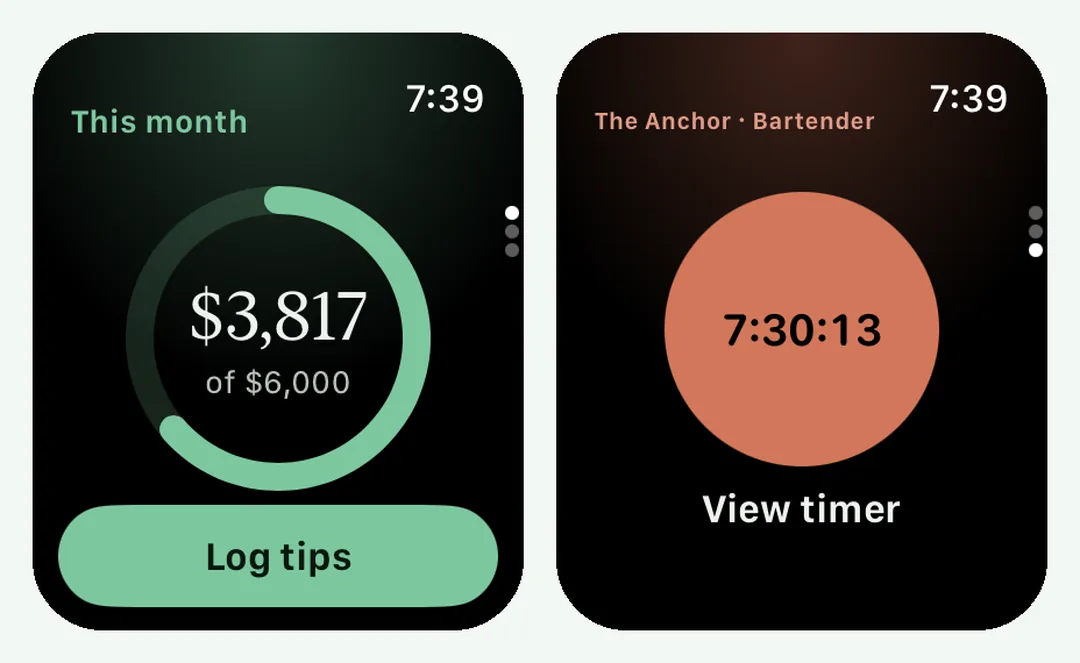
The new Watch app is made for the walk out of work, before you reach your car. Its Home screen is a few pages you turn with the Digital Crown: what you've made in a ring, a goal if you pick one, and Start shift.
- Log tips in a few taps. Tap Log tips and set Cash, Card and Out (what you tipped out) on one screen, turning the Digital Crown or tapping an amount to type the cents. Tap Next, look over the job, day and hours on Check, and tap Save. Tip’d fills in your job, your position and the hours you last saved for them, so most nights it's just the money. It asks Where? only when it can't tell which job you mean.
- Start a shift timer when you clock in. Tap Start shift, and the timer keeps going even when you leave the app. Take an Unpaid break and that time is left out. When you're done, tap Finish shift, then Finish & review, and your tips open with the hours already filled in. Nothing is saved until you tap Save, and a shift that runs past midnight counts the real time.
- Your earnings and a goal at a glance. The ring shows what you've made, filling toward your week, month or year target if you've set one, and the next page shows the goal you choose. Tap the ring for the details to the cent: your hours, what you made per hour, the week and today.
- On your watch face. Add Tip’d to your watch face or the Smart Stack: Log a shift, Shift timer, Watch earnings and Watch target. Your earnings stay off the face, which shows Earnings hidden, until you turn on Show earnings on watch face under Apple Watch in Tip’d's Settings on your iPhone. That's also where you pick your default job, which target to show and which goal.
- No iPhone nearby? Your Apple Watch holds your shift, saying Kept on your Watch, until you're back with your iPhone, then sends it. It says Saved in Tip’d only once your iPhone has really saved it.
The Watch app works with the iPhone app, which keeps your records. Editing or deleting saved shifts, sales and notes, imports, your jobs, and moving money in or out of a goal stay on the iPhone. It needs an Apple Watch with watchOS 10 or later. If Tip’d isn't on your Watch after the update, install it from the Watch app on your iPhone.
iPad: your week, calendar, stats and goals on a bigger screen
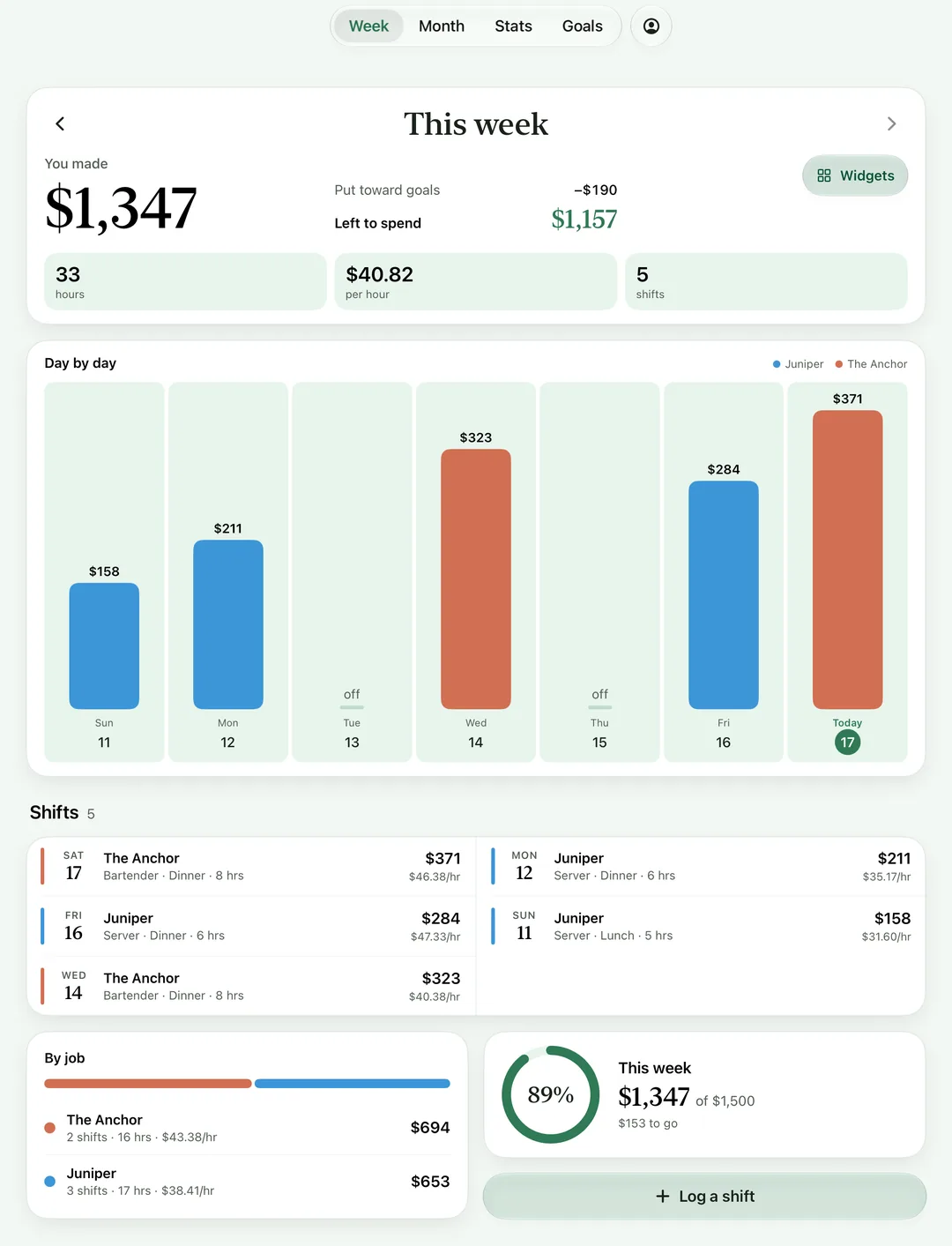
Tip’d is now an iPad app too, laid out for the bigger screen instead of a stretched iPhone. Upright or sideways, Week, Month and Goals each become one wide screen: the month's calendar with your totals and the day you tap, the week's chart with its shifts and target ring, and your goals in one big card. Stats, the year and Settings use two columns. In a narrow window beside another app, Tip’d switches to the iPhone layout.
- The same records as your iPhone. With iCloud on and the same Apple Account on both, your records stay in sync between your iPhone and your iPad, so a shift you log on one shows up on the other.
- Keyboard shortcuts. With a keyboard attached, ⌘N opens Log a shift and ⌘1 to ⌘4 switch between Week, Month, Stats and Goals.
- No Watch on iPad. An iPad can't pair with an Apple Watch, so the Watch app works through your iPhone.
A simpler Log a shift
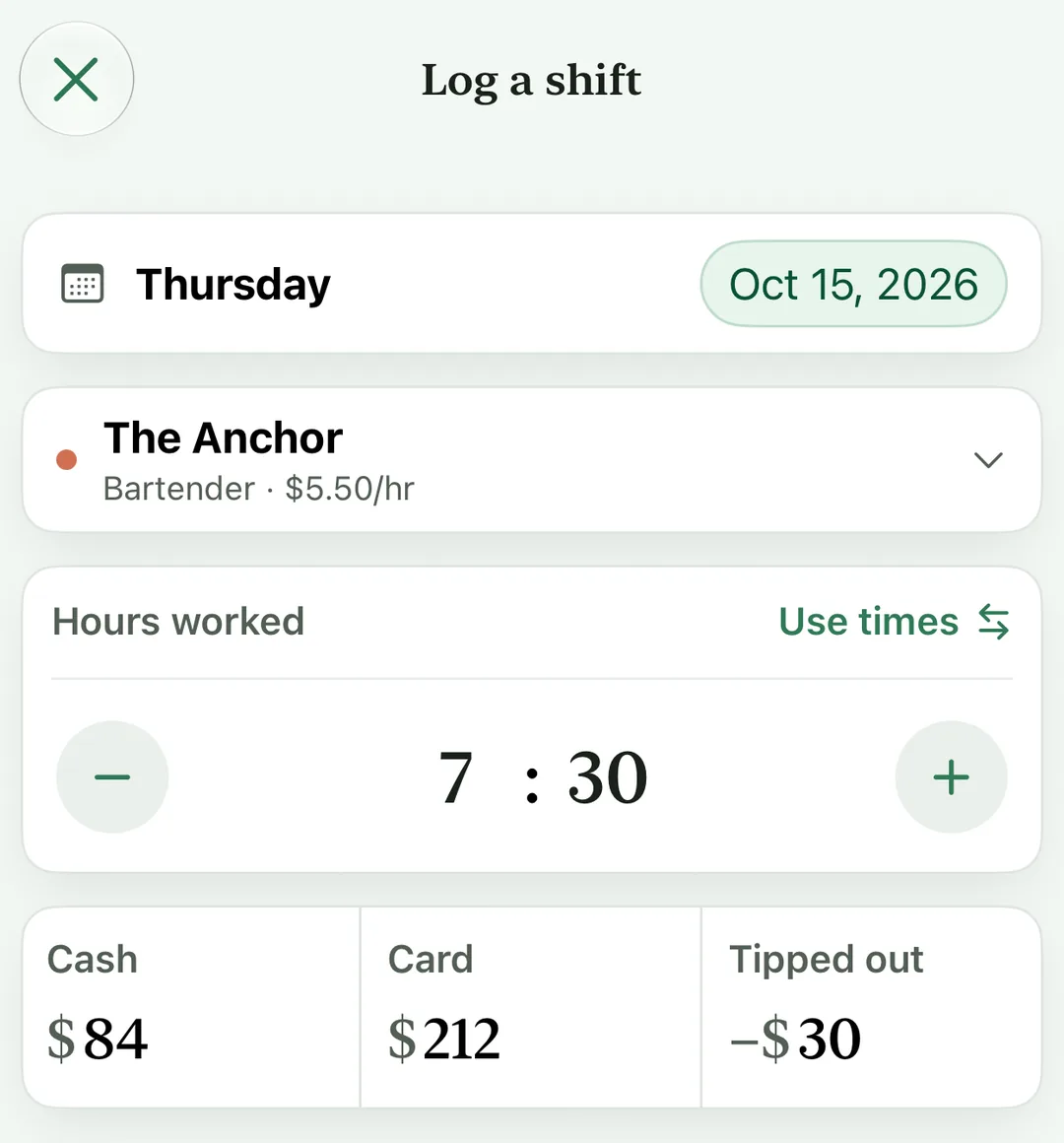
Hours worked now works two ways. Type your hours and minutes, or nudge them with the − and + buttons. Or tap Use times, enter when you clocked in and when you clocked out, and Tip’d does the math.
- Past midnight is fine. Clock in at 6 PM and out at 2 AM and that's 8 hours, marked Ends next day. The shift stays on the day it started, and on the night the clocks change, Tip’d counts the time you really worked.
- Your clock, your way. Times follow your iPhone's 12-hour or 24-hour setting.
- It remembers. Your next new shift opens the way you used last. Tip’d saves the hours you worked, not the clock times, so your totals and hourly pay add up exactly as before.
A free Log a shift button for Control Center
On iOS 18 and later, Tip’d can put a Log a shift button in Control Center: open Control Center, tap +, then Add a Control, and pick Log a shift under Tip’d. You can put the same button on your Lock Screen, or on the Action button of an iPhone that has one. One tap opens Log a shift on Week, or Add a job if you haven't set one up yet.
The button is free for everyone. It isn't part of the Widget Pack.
Export just the dates you need
Exports used to cover the whole year. Now, on Stats, open the year card (2026 so far) and, under Export, pick from the dates menu: the whole year, any month you logged a shift or paycheck in, or Choose dates… with a start date and an end date. Spreadsheet and Summary then make the file for just those dates. Your dates stay inside the year on screen, so a stretch over New Year's Day takes two files.
That helps when a landlord or a lender asks for last month only, or when you want to check one pay period against your paycheck. Our guide on how to prove tip income covers what those records need to show.
Goal history, month by month
Tap a goal on Goals, and its History now goes month by month, newest first. Each month shows what you put in that month, less anything you took out, and a bar for how much of the goal that month filled. Tap a month to see its entries, and tap an entry to change it.
Your best and slowest days, all time
On Stats, tap All-time hourly, with tips to open the card. Best day and Slowest day used to look only at your last 8 weeks. Now they look through every shift you've ever logged, and each one shows its date (with the year, if it wasn't this year) and the job.
Smaller things you'll notice
- 27 languages. Up from ten in 1.3. Tip’d follows your iPhone's language for the app, and Arabic, Hebrew, Persian and Urdu read right to left.
- A short tour, once. The first time you open 1.4 after updating, a small New in Tip’d card shows four short clips of the Watch and iPad apps. Tap Got it and it won't come back.
- Fixes. We've fixed bugs, tightened up your totals and improved VoiceOver support.
Still free, and still private
Everything in 1.4 is free: the Apple Watch app, the iPad app, the Control Center button and the rest. The only thing you can buy in Tip’d is the optional Widget Pack, a monthly subscription for Home Screen and Lock Screen widgets on iPhone and iPad. Logging shifts, tips, tip-outs, hourly pay, two jobs or more, stats, goals, imports and exports cost nothing, with no ads and no account.
There's no account to make, nothing reaches us, and your watch face keeps your earnings hidden unless you choose to show them. The privacy policy spells out the rest.
Tip’d is on Android now too, on Google Play, for phones, tablets and foldables. To see how Tip’d compares with other tip trackers, read our ranking of the best tip tracker apps.
Questions people ask
When did Tip’d 1.4 come out?
On November 10, 2026, as a free update on the App Store.
Is the 1.4 update free?
Yes. The update and everything in it are free, the Apple Watch and iPad apps included. The only purchase in Tip’d is the optional Widget Pack subscription.
What do I need for Tip’d on Apple Watch?
An iPhone with Tip’d, which needs iOS 17 or later, and an Apple Watch paired with it, with watchOS 10 or later. Add a job on your iPhone first: until you do, the Watch asks you to open Tip’d on your iPhone.
Does Tip’d on iPad sync with my iPhone?
Yes, through your own iCloud, with iCloud on and the same Apple Account on both. The iPad app needs iPadOS 17 or later.
Is Tip’d on Android?
Yes. Tip’d for Android is on Google Play for phones, tablets and foldables with Android 9 or later. It has no Apple Watch app, and it syncs through your own Google Drive instead of iCloud.
Can Tip’d see my tips?
No. Your data stays on your devices and in your own iCloud. There's no account, and nothing is sent to us.